This is the long-form buying guide. Plans, prices, and checkout live on the DJ Request pricing page.
DJ Request Pricing Guide
How the three plans, the paid-request fee, and the trial fit together, so you can pick before your next event.
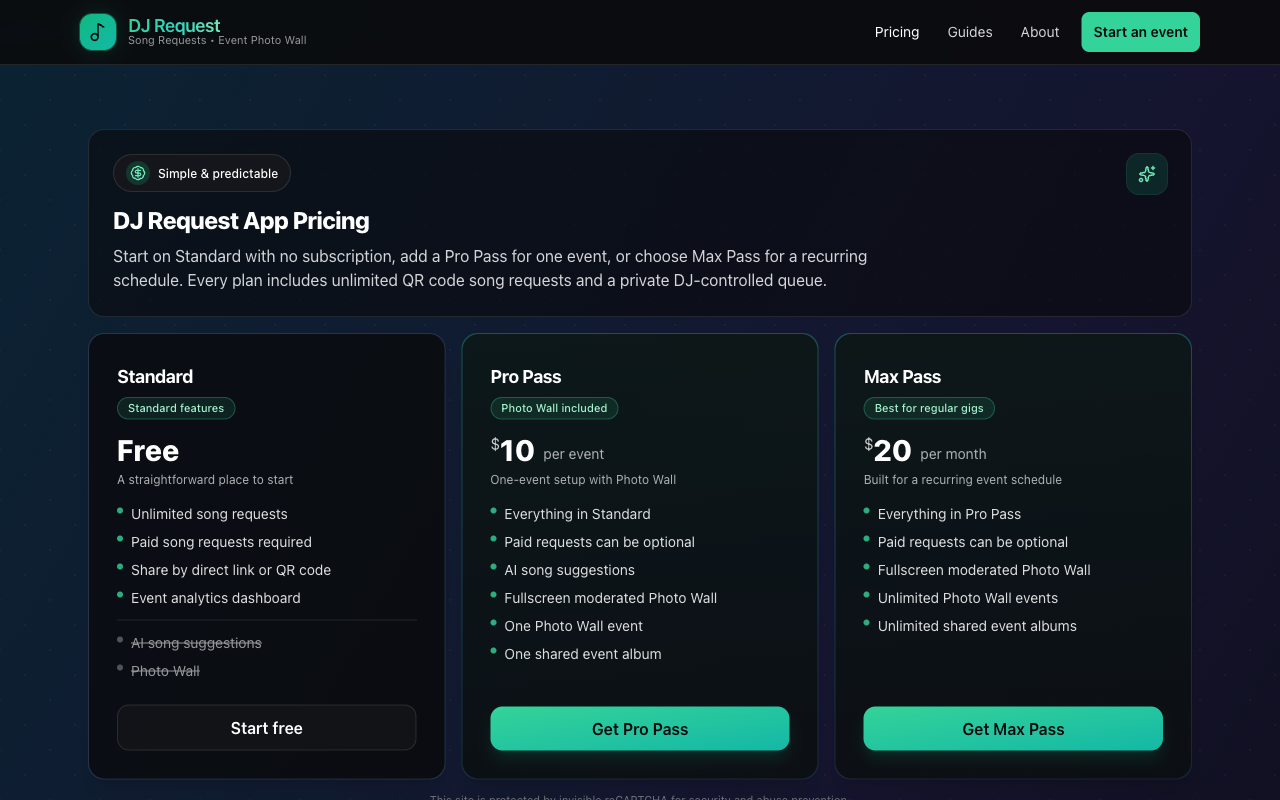
Standard costs nothing to subscribe to. Pro Pass ($10 per event) and Max Pass ($20 per month) add the Photo Wall, AI suggestions, and the option to make guest requests free. This guide explains the differences; the pricing page is where you buy.
The three plans side by side
| Plan | Price | Included | Not included |
|---|---|---|---|
| Standard | Free |
|
|
| Pro Pass | $10 per event |
| — |
| Max Pass | $20 per month |
| — |
Two kinds of “free”
The most common confusion is between a free subscription and free guest requests. They are separate decisions.
Subscription cost vs. what guests pay
- The Standard subscription is free. On Standard, guest song requests are paid (minimum $1). On Pro Pass and Max Pass, you can set requests to free or paid per event.
- During the 30-day trial for new accounts, every guest request is free. After the trial, Standard needs Stripe payouts to be ready before requests can be switched on. Pro Pass and Max Pass can use a $0 request price; paid requests always need Stripe payouts to be ready.
- Guest payments are authorized when the request is submitted and captured only when the DJ accepts. Declining releases the hold.
- DJ Request charges a 15% app fee on the accepted base request amount. Tips and boosts have no DJ Request app fee. Stripe processing fees and payout timing are separate.
- Guests can add an optional boost of $2, $5, $10, $20 at checkout to move their request up the DJ's queue. Boosts are optional and never required to submit.
Current plan details are always on the pricing page.
Which plan fits your calendar
Stay on Standard if…
- You want a request queue and QR code with no monthly cost.
- Paid requests (from $1) fit your events.
- You do not need the Photo Wall or AI suggestions.
Buy a Pro Pass if…
- You have one wedding, party, or corporate event coming up.
- The client wants a Photo Wall or free guest requests for that night.
- You want to pay $10 once rather than start a subscription.
A pass activates a 24-hour window. Only one pass is active at a time.
Choose Max Pass if…
- You play two or more events a month with the Photo Wall or free requests.
- You run a weekly residency or a venue with a recurring wall.
- You want one predictable monthly charge instead of per-event passes.
Two Pro Pass purchases in a month already cost the same as Max Pass.
Illustrative paid-request scenarios
These are planning examples, not customer results. They assume every request listed is an accepted base request on Max Pass, and they exclude Stripe processing fees and any boosts. Real volume varies widely by event and crowd.
Wedding DJ
- Events
- 4 per month
- Accepted requests
- 50 per event
- Price per request
- $10
- Gross base requests
- $2,000
- 15% app fee
- −$300
- Max Pass
- −$20
- Before Stripe fees
- $1,680
Bar or club DJ
- Events
- 12 per month
- Accepted requests
- 30 per event
- Price per request
- $5
- Gross base requests
- $1,800
- 15% app fee
- −$270
- Max Pass
- −$20
- Before Stripe fees
- $1,510
Mobile DJ
- Events
- 8 per month
- Accepted requests
- 40 per event
- Price per request
- $8
- Gross base requests
- $2,560
- 15% app fee
- −$384
- Max Pass
- −$20
- Before Stripe fees
- $2,156
Fees in one sentence
15% of the accepted base request, nothing on boosts or tips, and Stripe's own processing fee on the payment total.
Declines cost nothing
Payment is authorized when the guest submits and captured only when you accept. A declined request releases the hold, so no fee applies.
The trial, precisely
30 days, no card, Photo Wall capped at 10 guest photos a day, up to 5 AI suggestions. Guest requests are free for the whole trial; paid requests start afterwards.
Pricing guide FAQ
- What DJ Request plans are available?
- Standard has no subscription charge and requires paid guest requests. Pro Pass is $10 per event and covers a 24-hour event window. Max Pass is $20 per month for a recurring schedule. The live pricing page always shows the current plans.
- What fees apply to paid requests?
- DJ Request applies a 15% app fee to the accepted base request amount, but not to tips or boosts. Stripe processing fees apply separately, and payout timing follows the connected Stripe account.
- Which plans include the Photo Wall and AI suggestions?
- Pro Pass and Max Pass include the moderated Photo Wall, shared event albums, and AI song suggestions. Standard does not. New accounts get a 30-day trial of both features.
- Can an event accept free song requests?
- During the 30-day trial, every guest request is free. Afterward, on Pro Pass and Max Pass you can set the request price to $0 so guests request for free, or keep a price. On Standard, requests are paid with a $1 minimum.
- What does the free trial include?
- The 30-day trial unlocks the Photo Wall (up to 10 guest photos per day) and up to 5 AI song suggestions. During the 30-day trial for new accounts, every guest request is free. After the trial, Standard needs Stripe payouts to be ready before requests can be switched on. Pro Pass and Max Pass can use a $0 request price; paid requests always need Stripe payouts to be ready.
- Does DJ Request pay out instantly?
- No. Accepted payments are captured to your connected Stripe account, and Stripe controls when funds reach your bank based on your account's payout schedule and status.